[$] Scope-Creep Response Kit

For freelancers and 1–3 person service businesses

The words for
“can you just also…”

A client asks for something outside the scope. You have ten minutes to reply, and you don't want to sound petty, work for free, or start an argument. This kit is the reply. Copy, fill in the brackets, send.

“Every time I read the advice it's always ‘have a better contract’ or ‘learn to say no’… what I actually want to know is what's happening in the MOMENT. Is there a script you copy paste?” Developer, r/smallbusiness, February 2026. 39 replies, none of them a script.

Yes. Here's one of the fourteen.

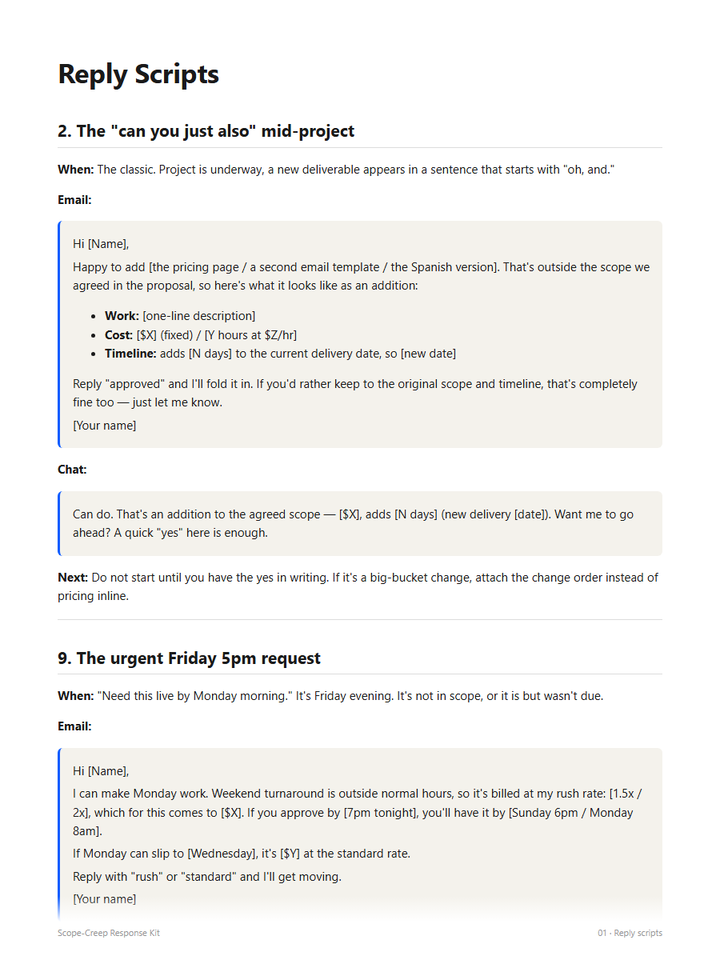
Script 2 · The “can you just also” mid-project

When: the project is underway and a new deliverable appears in a sentence that starts with “oh, and.”

Hi [Name], Happy to add [the pricing page / a second email template / the Spanish version]. That's outside the scope we agreed in the proposal, so here's what it looks like as an addition: • Work: [one-line description] • Cost: [$X] (fixed) / [Y hours at $Z/hr] • Timeline: adds [N days] to the current delivery date, so [new date] Reply “approved” and I'll fold it in. If you'd rather keep to the original scope and timeline, that's completely fine too. Just let me know. [Your name]

Slack version: “Can do. That's an addition to the agreed scope: [$X], adds [N days]. Want me to go ahead? A quick ‘yes’ here is enough.”

Notice what isn't in it. No “unfortunately.” No “I'm afraid I'd have to charge.” No “I hope that's okay.” Those words teach a client that extra is bad news. “Happy to, that's $X” teaches them extra is normal.

What's inside

All fourteen situations, named.

Each script has an email version, a shorter Slack version, a one-line “when to use it,” and a note on what to do next.

  1. The tiny ask you'll absorb, but want on the record
  2. The “can you just also” mid-project
  3. The request disguised as a bug, or “I assumed this was included”
  4. Feedback round #4 when the contract said 2
  5. Client's friend, boss, or spouse wants changes
  6. “While you're in there…” after delivery
  7. Asking for source files or extras not in scope
  1. The client who keeps adding stakeholders
  2. The urgent Friday 5pm request
  3. “We're a startup, can you do it for exposure / equity / a discount?”
  4. The scope change that actually makes the project better (say yes, get paid)
  5. The client who disputes that something was out of scope
  6. Polite escalation after two ignored change orders
  7. Pausing work until the change order is signed

Plus the paperwork around them

02

Change order template

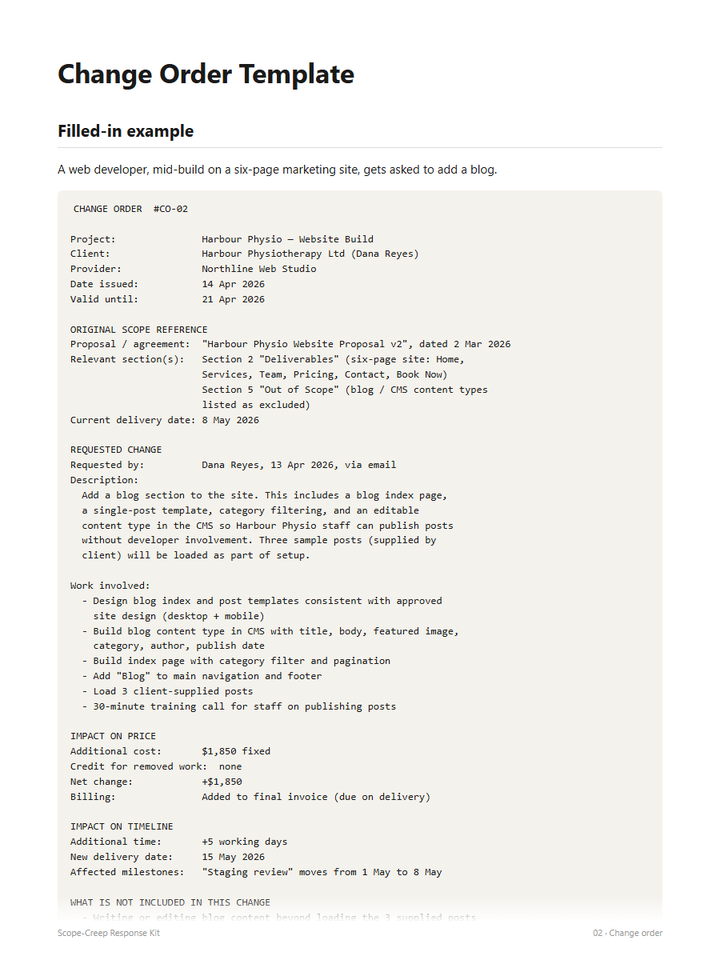
One page: original scope by reference, the change, price, timeline, what's not included, and a line that makes an emailed “approved” count as a signature. With a filled-in example from a real-shaped project.

03

Pricing the ask

Five numbers you set once so a quote is arithmetic instead of a negotiation with yourself: change rate, absorb threshold, half-day minimum, hourly vs fixed, rush multiplier. Then 8 common requests priced out.

04

Six proposal clauses

Plain-English paragraphs for the next proposal: scope definition with a “not included” list, revision rounds, change order process, rush fees, out-of-scope rate, single approver.

05

One-page cheat sheet

The 3-second decision rule, the five sentences that handle most situations, and the change order checklist. Print it.

00

Start here

The tone rules, the tiny / small / big rule, and what to expect the first time you send one of these to a real client.

web

Reply generator

Pick the situation, type the client's name and your numbers, copy the finished email and Slack message. Three situations are free to try; all fourteen unlock for buyers.

zip

Formats

One clean PDF of everything (about 30 pages), plus each section as a Markdown file you can paste into Notion, Google Docs, Obsidian, or your email templates.

Preview

Actual pages from the PDF.

Not mockups. These are three of the pages, straight from the file you'll download.

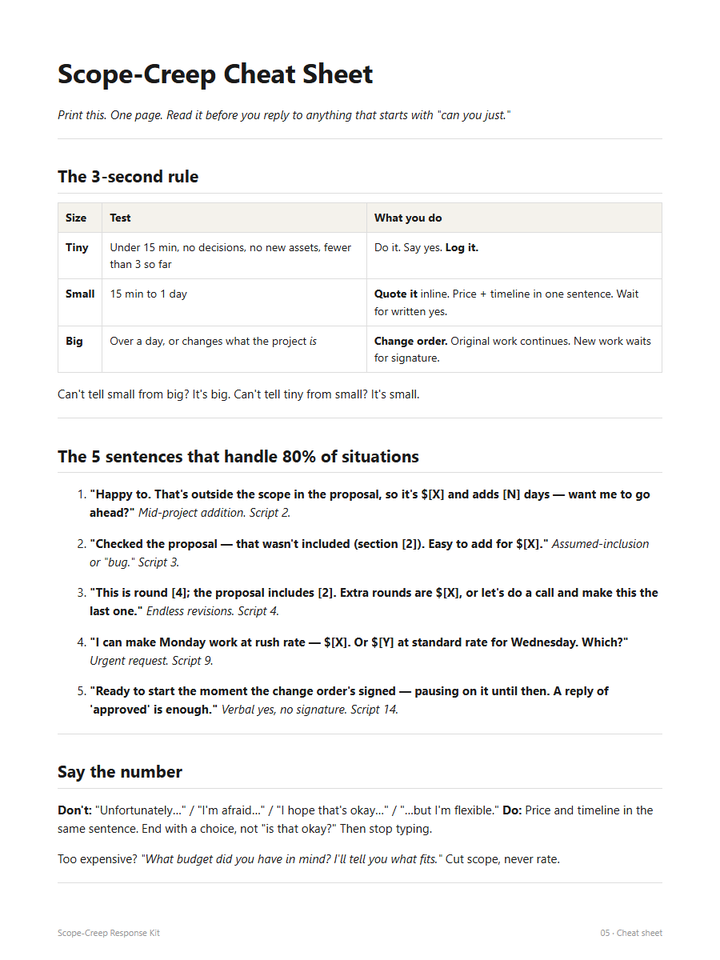
The one-page cheat sheet: the 3-second rule table and the five sentences
05 · The cheat sheet. The 3-second rule and the five sentences.
Two reply scripts with email and chat versions
01 · Scripts 2 and 9, each with an email and a Slack version.
A filled-in change order example for adding a blog to a website build
02 · The change order, filled in for a web build that grew a blog.

The method

Decide the bucket before you type a word.

SizeTestWhat you do
TinyUnder 15 minutes, no decisions, no new assets, fewer than 3 so farDo it. Say yes. Log it.
Small15 minutes to a dayQuote it inline. Price and timeline in one sentence. Wait for a written yes.
BigOver a day, or it changes what the project isChange order. Original work continues. New work waits for a signature.

Can't tell small from big? It's big. Can't tell tiny from small? It's small.

Every script then follows the same four beats: acknowledge, classify, price or path, ask for the go-ahead. Warm because you want the client. Firm because you want the business. The scripts almost never contain the word “no.” You aren't refusing; you're saying what it costs.

Get the kit

Everything above, for less than one absorbed “quick change.”

  • 14 reply scripts, email and Slack versions
  • Change order template with a filled-in example
  • Pricing framework and 8 priced examples
  • 6 plain-English proposal clauses
  • Printable one-page cheat sheet
  • PDF plus editable Markdown files
  • All 14 situations in the online reply generator

Pay with card, Apple Pay, Cash App, or Klarna through Stripe. You're sent to the download page the moment payment clears, and Stripe emails a receipt.

$19one time

No subscription. No upsell. No “pro” tier.

Buy now
14-day refund, no questionsIf it isn't useful, email within 14 days and you get your money back. Keep the files.

Who made this

A small product from a small company.

IL

Ian Lehrer, Lehrer Group LLC, Spring, Texas.

I build small, specific tools for people who bill by the project. This one exists because the answer to “is there a script you copy paste?” was always “no, but here's a lecture about contracts.” The scripts were written to be sent to real clients, not admired. They were drafted and edited with heavy AI assistance, which I'd rather say plainly than have you guess. If one of them lands badly with a client, I want to hear about it and fix it.

lehrerenterprise@gmail.com · @scopecreepkit

Questions

Is this just “say no nicely” advice repackaged?

No advice at all, mostly. It's the actual sentences, with the numbers and dates as fill-in blanks, for fourteen specific situations. The free page has three of them in full, and the generator lets you fill those three in right now, so you can judge before paying.

Couldn't I just ask ChatGPT for this?

You could get something like it, yes. What you'd be doing is the work this kit already did: naming the fourteen situations that actually come up, finding the wording that doesn't sound like an apology or a threat, setting the pricing rules, and putting it where you can find it at 4:47pm without prompting anything. If you'd rather do that yourself, do. The three free scripts are yours either way.

I'm a designer / copywriter / consultant, not a developer. Does it fit?

Yes. The placeholders are things like “[the pricing page / a second email template / the Spanish version]” on purpose. The situations are identical across service work; only the deliverable names change.

Is it legal advice?

No. The clauses are plain-English starting points a working freelancer would recognize. Have a lawyer look at anything you'll rely on in a dispute. Full terms.

What if the download fails or I lose the file?

Your download page keeps working, and Stripe emails a receipt with the link. If anything breaks, email and I'll send the zip directly.

Why $19?

Because a single absorbed “quick change” costs you more than that, and because I'd rather a thousand freelancers have it than fifty. If it saves you one unbilled hour it has paid for itself several times over.